MyFactoryStudio

Upload a drawing. Print the object.

MyFactoryStudio turns your own artwork into printable, multicolour objects — fidget clickers, enamel pins and keychains. The tracer splits your image into colour layers you can edit by clicking them, and what you export is a Bambu project with your AMS palette already assigned, plate by plate.

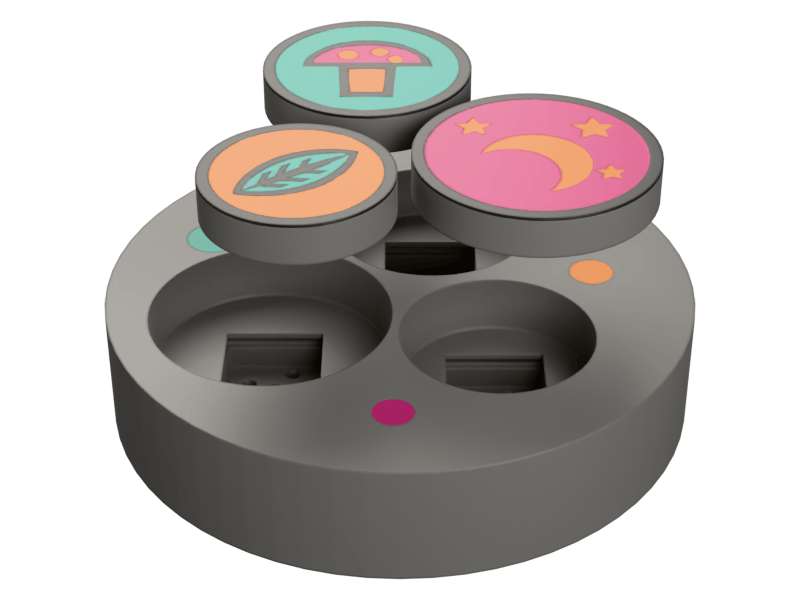
A printed fidget clicker in pieces: three round caps, each carrying different artwork — a mushroom on mint, a leaf on peach, a crescent moon and stars on pink — floating above the grey base that sockets a switch under each of them

Supports

None

Switch types

2

Switch pocket

14.0 mm

Resin floor

0.6 mm

Keyring lug

3.0 mm

Three products, one artwork pipeline

Every one of them starts from the same traced artwork. What changes is what gets built behind the face.

Three printed clicker caps — a mushroom on mint, a leaf on peach, a crescent moon and stars on pink — lifted clear of the grey base whose three wells each hold a square switch socket, with small coloured inlays set into its top

Fidget clicker

A cap that snaps onto a real Cherry MX or Kailh Box switch, over a base that sockets it. The artwork prints as colour layers in the cap face; the base takes a plate-mount latch socket, so the switch hooks in the way it would in a keyboard. Cap and base come out on two plates of one Bambu project.

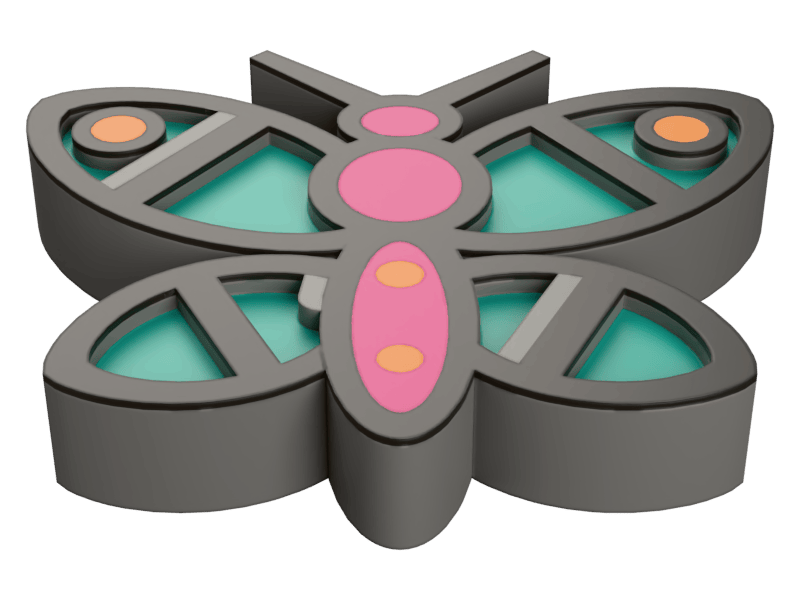
A butterfly-shaped enamel pin before its resin: grey printed walls outlining four teal-floored wings, a pink body marked with orange dots, and an orange-floored well at each upper wingtip — every cell still empty

Enamel pin

Cloisonné, printed. Your artwork’s shapes sink into open wells with printed walls between them, and you flood them with UV resin. Click a shape to sink it and the rest of its colour stays flush as the wall — so a black outline can hold the line while black eyes become cells. It prints face up, because a well built face down would bridge its own floor across the surface you are about to pour onto.

A round printed keychain fob carrying an owl face: a teal ground with two large orange-ringed eyes, a small orange beak and a round orange belly between pink side panels, all divided by grey printed outlines, with a bored keyring lug at the top

Keychain

The cap on its own, with a keyring loop welded into the part’s outline. The loop is a lug, not a slab of the part: it thins to 3 mm on whichever face reaches the bed, so it prints flat and hangs flat. One plate, one print.

Artwork in, printable project out

  1. Upload your art

    A drawing, a render, a logo. The tracer strips the background, quantises to a printable palette and vectorises it. The palette is reproducible by construction, so the colour slot you recoloured is still the same slot after the next trace.

  2. Edit the layers by clicking them

    The wizard shows you the traced shapes. Click one to move it to another colour, to sink it into a resin well, or to thicken the wall around it. Every pick is keyed to a point on the artwork rather than an index, so it survives a resize, a palette recolour and a re-trace.

  3. Export a Bambu project

    One .bbl.3mf in which every body is a named part of one object, with extruder assignments from your AMS palette and the print profile already set. Several products can share a plate, because a tool change costs a wipe tower and that cost is per print job — five variants on one plate purge once instead of five times.

Line art does not survive a 0.4 mm nozzle on its own

Every rule below was measured — on real traced artwork, or on one of our own outputs that came out wrong.

A cloisonné wall has to be thicker than one extrusion

Traced line art is routinely far thinner than a printable wall. On one dragonfly illustration the veins measured 0.30 mm at print scale — under a single 0.42 mm extrusion, so the slicer dropped them outright and the resin cells ran together into each other.

The fix is not to thicken everything. Growing whatever is thin in every colour grows the cells too, and on line art the cells are thin as well, so they merge across their own veins: the same dragonfly went from 32 wells to 14, and one strength further up, to 1. So the wall colour is grown and no other, clipped to the artwork union so the silhouette never moves, and applied after per-shape recolouring so it follows the colours you can actually see. A 0.4 mm wall takes that 0.30 mm vein to 1.10 mm.

A butterfly-shaped enamel pin, its teal wings and pink body sunk into open resin cells and divided by the grey printed walls between them

Measured on one illustration

Traced vein width
0.30 mm
One extrusion
0.42 mm
After a 0.4 mm wall
1.10 mm
Resin cells on that pin
32
Cells left after Thicken
1

The palette has to come out the same every time

The tracer’s histogram returns its colours sorted, and that is load-bearing rather than tidy. Hash iteration order is randomised per process, and the median cut splits at a single-channel weighted median, so unsorted input moved the split: one run in eight produced a different palette. An editor where you recolour a slot cannot be built on top of that — the slot you targeted may not exist after the next trace.

The colour count is a ceiling, not a quota

Slots are spent on visibly different colours, and a slot with nothing distinct to spend it on is dropped instead of padded. A two-colour render used to come back with five entries, three of them off-whites within six of each other — three spool rows for one colour. In the other direction, a pink tongue covering 0.40% of an illustration sat 74 away from its nearest entry and printed as mint, while two greens 19 apart held a slot each. Rich artwork is unaffected and keeps every slot.

A switch is held by its latches, not by a tight pocket

A pocket sized to the top housing grips nothing: the body has 0.8 mm of slop per axis and rests on its own pins, which is exactly the “flat but doesn’t hold, sits at an angle, falls out” report. An MX footprint has three widths and only one of them is grippable — the 14.0 mm below-plate body. So the base cuts a real plate-mount socket: a 14.0 mm body pocket, a 16.0 × 1.5 mm relief for the sprung plate latches, and a 1.0 mm lip above it for those latches to hook under. Both dissected reference clickers do the same thing.

Three files, and one of them is a whole project

.bbl.3mf

A Bambu Studio project. Every body is a named part of one object, so parts that belong together cannot be dragged apart in the slicer; parts carry extruder assignments from your AMS palette, and several plates are laid out by physical offset.

.3mf

Each body its own object, millimetre units, written and then read back through a real 3MF parser before it leaves — so a file that would not open is a build failure here rather than a surprise on your machine.

.stl

One merged binary mesh in millimetres. The format every slicer opens, for the single-colour, single-body case.

The Bambu project carries the print profile too, grafted from a real project export rather than synthesised: Classic wall generator, thin-wall detection off, random seam, 0.2 mm layers. Those are not defaults we liked the look of — they are the settings the reference prints shipped with.

gf clicker --svg design.svg --no-base --keychain --out keychain.bbl.3mf

Three tiers

Monthly, annual, or buy one outright. See the full comparison.

Maker

$9/mo

Billed monthly

Keychains and spinner rings, ready for the plate.

Studio

$24/mo

Billed monthly

Adds enamel pins, planetary and stacked rings, and 3MF.

Workshop

$59/mo

Billed monthly

Adds the clicker — cap, switch seat and base. Everything else too.

Print something with your own art on it.

Start with a keychain — one plate, one print — then move up to a clicker.

Get started